Article too long to read?
FilmFreeway has rolled out early access to several new project-page features ahead of an upcoming visual redesign. Available now for all project types, the update introduces a dedicated logline field, higher-resolution poster support, 1080p Full HD trailers, and a new genre field with predefined options.
The platform is encouraging filmmakers to log in, update their assets, add a logline, and review their pre-filled genre selections before the new look goes live. The announcement does not specify a launch date for the redesigned pages.
What the Redesign Preview Shows
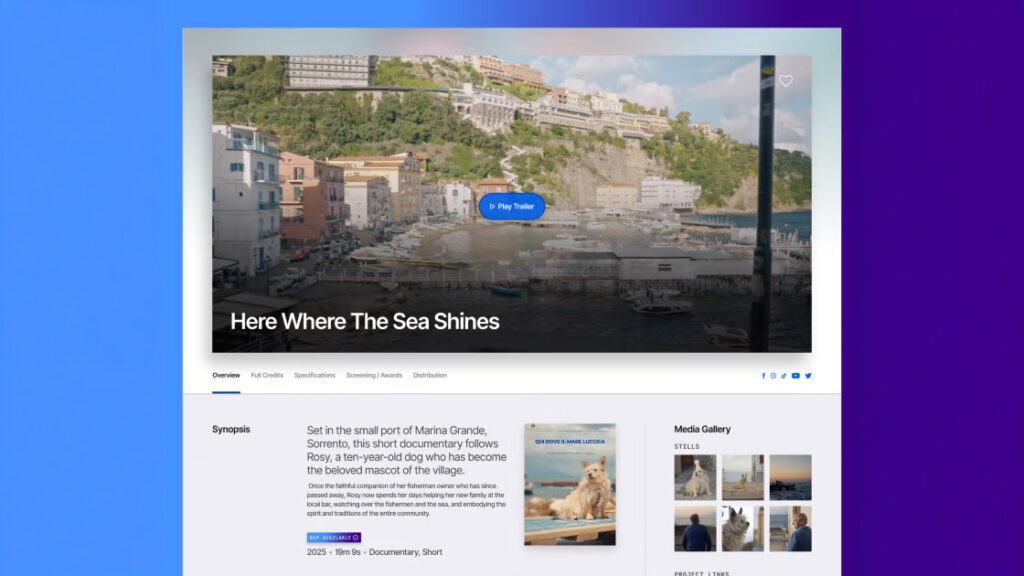
The announcement includes a preview of the upcoming layout, showing a widescreen banner image displaying the project title and a central “Play Trailer” button.
Below the banner, the preview shows navigation tabs for Overview, Full Credits, Specifications, Screening / Awards, and Distribution, along with social media icons. In the example’s overview section, the layout pairs a synopsis, poster, runtime, year, and a “DCP Available” badge with a Media Gallery displaying stills, with a “Project Links” heading at the bottom.
New Features Available Now
Filmmakers can immediately access four updates across all project types:
- Logline: A dedicated field for a 1–2 sentence summary designed to sell the project.
- Improved Poster Resolution: The maximum poster height has increased from 800px to 2000px.
- Improved Trailer Quality: Trailers can now be uploaded in 1080p Full HD, up from 720p.
- New Genre Field: A new genre field featuring a set list of genres to choose from.
Reviewing Your Pre-Filled Genre
To help users transition to the new genre set list, FilmFreeway has pre-filled the genre field for existing projects based on the genre information filmmakers previously entered.
How to Prepare Your Project Page
Ahead of the redesign launch, filmmakers can log into their FilmFreeway accounts to get their pages ready:
- Review your genre in the new genre field to confirm the pre-filled selection fits your project, or switch to another option.
- Add a 1–2 sentence logline to summarize and pitch your project.
- Upload a higher-resolution poster—up to 2000px in height—if you have a suitable file available.
- Upload a 1080p Full HD trailer if you have a native Full HD version ready to replace an older 720p upload.
No comments yet.
Got Something to add to this article?
Your email address will not be published. Required fields are marked *