Article too long to read?
You're on a Sunday night deadline, the edit is locked to Monday morning, and the one thing the scene still needs is a sung line that no one available can deliver in time. The actor has the emotion, the frame has the movement, but the vocal booth is empty. That's where an AI singing voice generator becomes a practical production tool, not a novelty.
Used well, it gives you a sung performance from inputs you already control, like lyrics, melody, and style notes. Used badly, it can create a voice that drifts off-melody, muddies the words, or opens legal problems you didn't budget for. For short-film creators, the main question isn't whether the technology exists. It's where it helps the cut, where it hurts the cut, and what you need to clear before you press export.
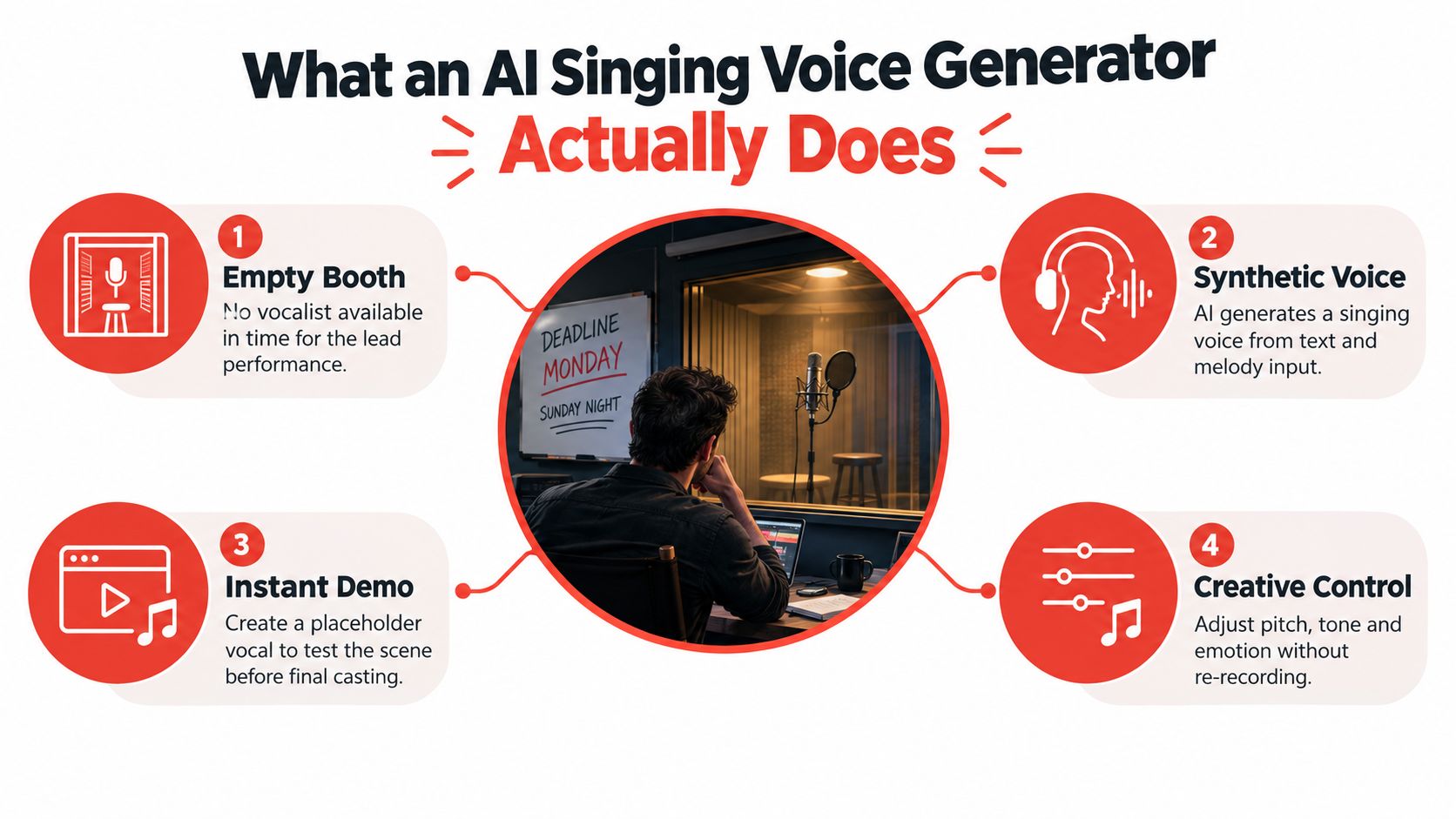
Table of Contents
- What an AI Singing Voice Generator Actually Does
- How the Technology Turns Text Into a Singing Performance
- Where AI Singing Fits in a Short Film Workflow
- How Vocuno Can Help
- Evaluating Output Quality Beyond a Single Score
- Legal Questions Creators Rarely Ask but Should
- A Practical Checklist for Short Filmmakers
- Where AI Singing Voices Are Headed Next
What an AI Singing Voice Generator Actually Does
A good way to think about an AI singing voice generator is as a virtual vocalist that works from your creative materials. You give it a lyric, a melody line, and sometimes a reference voice or style prompt, then it returns an audio file you can drop into your timeline. That file can act as a scratch track, a temp performance for a cut, or a final sung moment when the story needs a voice and your casting window has closed.
This is different from ordinary text-to-speech. Text-to-speech tries to pronounce words clearly, while singing has to carry pitch, phrasing, breath, timing, and emotional contour across a melody. A sung line can't just sound intelligible, it has to land on the note, release on time, and match the scene's mood without feeling pasted on.
What it is useful for on a short film set
A director might use it to demo a song for a producer meeting, or to build a temp vocal for animatics before the singer is booked. In a diegetic performance, it can stand in when the scene depends on a voice that isn't available during the shoot. That doesn't make it a replacement for a live performer, it makes it a production utility that protects the schedule.
Practical rule: if the voice is helping you make a decision, it's probably being used correctly. If it's meant to hide that a human performer was never in the plan, you're in riskier territory.
The cleanest way to judge the output is simple. Ask whether the file solves a timeline problem, a casting problem, or a temporary creative gap. If it does, it has done its job. If it becomes the final voice in the cut, you need to check the quality, the rights, and the disclosure burden before you keep it.
How the Technology Turns Text Into a Singing Performance
The easiest way to understand the pipeline is to follow it the way you'd follow footage through post. The raw material gets captured, analyzed, transformed, then rendered into something the audience can hear. The result feels fast, but under the hood the system is doing a lot of very specific work to keep pitch, tone, and timing from breaking apart.
From source audio to learned vocal behavior
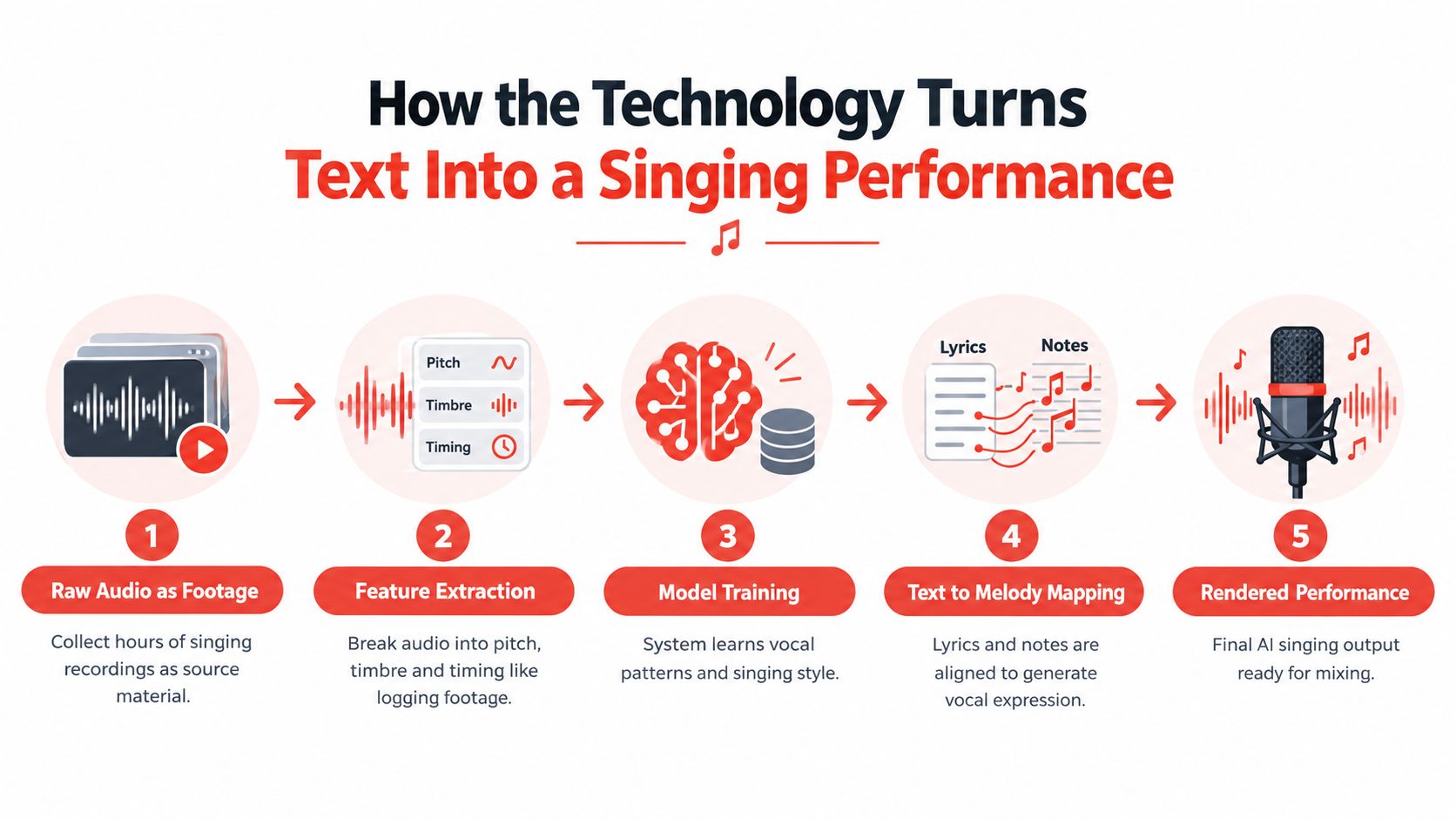
Training starts with raw audio, which is the equivalent of footage you're about to log. The system studies singing examples so it can map patterns in pitch, timbre, and timing. That's the part that gives the model a sense of how a voice behaves when it moves between vowels, consonants, and sustained notes.
Then the model learns how those patterns relate to the inputs you provide. Singing-specific systems need more than language understanding, they need alignment between the lyric and the melody. If the timing slips, the line can sound synthetic even when the tone is convincing.
Why rendering matters at the end
A neural vocoder acts like the rendering engine. It takes the learned vocal features and turns them into a continuous waveform you can hear, the way a colorist turns log footage into a finished master. The singing model itself handles musical behavior, while the vocoder handles the audible texture of the final voice.
That's why pitch curves, duration, and vibrato matter so much. They're the shot list of the voice. They tell the system where to emphasize, how long to hold, and how expressive the phrase should feel. In short-film work, that's the difference between a line that supports the scene and a line that pulls attention away from it.
The outputs you'll run into most often are text-to-singing models, which create the vocal from scratch, and voice conversion tools, which re-render an existing dry vocal in a different timbre. Both can fit into a short-film workflow, depending on whether you want a fully synthetic scratch or a guided performance that keeps a human phrasing shape.
What still affects the final sound
Quality still depends on the training data, how tightly the lyrics and melody line up, and the polish applied after rendering. De-essing, reverb matching, and mix placement matter because a synthetic vocal has to sit inside the film's sound design, not float above it. If the line feels like it came from another room, the audience notices before they know why.
Where AI Singing Fits in a Short Film Workflow
A short film gives you fewer shooting days, fewer takes, and less room to improvise around a missing piece. That's why the best use of an AI singing voice generator is usually as a bridge between departments, not as a magic trick in isolation. It helps the music, the camera, and the edit make decisions before the expensive human work is fully locked.
Pre-production uses that save the schedule
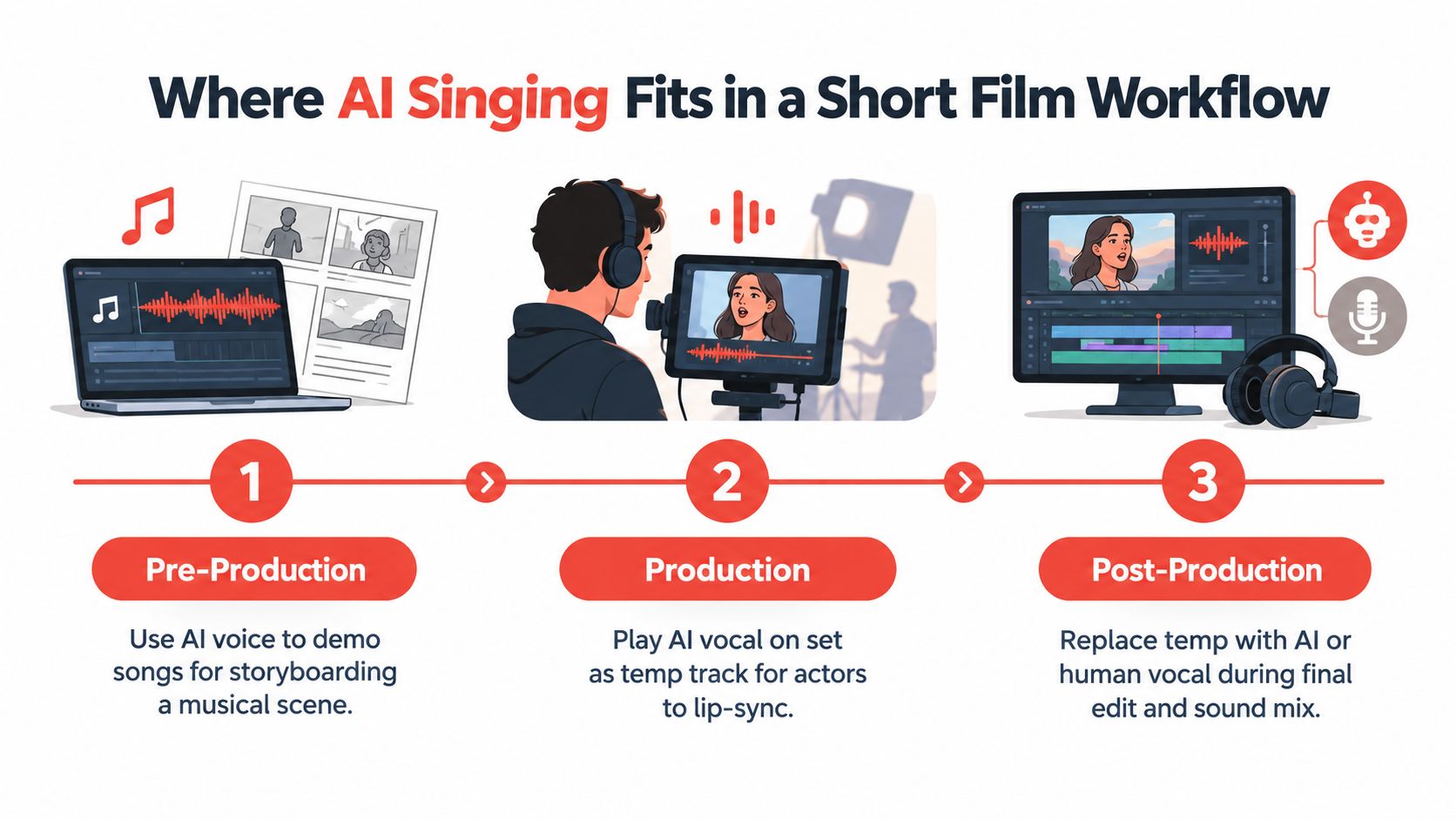
In pre-production, the most useful output is often a scratch vocal. A producer can hear whether the song supports the scene, a composer can lock melody against picture, and an animator can cut to a performance before the final singer is cast. If you're building a musical beat into an animatic, that placeholder voice can keep the timing honest.
The same logic applies when a scene hinges on a song but the storyboards are still moving. You can give the director and editor a performance shape to work with, which makes the next round of notes much more concrete. For planning other AI-heavy shortcuts in a short, this related guide from Indie Shorts Mag is a good companion read, AI tools to use for your next short film.
Production and post where it becomes practical
On set, a temp vocal can help actors lip-sync to something consistent, especially if the scene is built around playback. The director of photography can also block camera movement against a known rhythm instead of guessing where the phrase will breathe. If the singer isn't available for pickups, the AI track can preserve continuity long enough to finish the scene cleanly.
In post, the tool is most useful when a festival cut needs a working vocal and the budget won't cover a live re-record. It can also help when location noise ruins a usable take and you need an ADR-style repair for a diegetic performance. The important thing is to keep the human performance search alive in parallel, because the synthetic version is usually a working solution, not the final artistic answer.
How Vocuno Can Help
If you're choosing a platform instead of experimenting with a one-off tool, Vocuno is built for creators who want generation, analysis, and release prep in one workspace. Its appeal is less about novelty and more about reducing handoffs. For a short-film team, that can mean fewer tabs, fewer format changes, and fewer moments where a usable vocal gets stranded between tools.
A platform like Vocuno's AI singing voice generator is most helpful when you need to move from idea to export without rebuilding the same asset in several places. It can support the kind of workflow where you generate vocals, compare takes, separate stems, inspect BPM, and push files toward a mix-ready state without leaving the session. That matters because short-film deadlines rarely reward tool hopping.
What it solves in practice
The main value is decision speed. If you're comparing a temp vocal against a human take, you want to hear lyric clarity, melody fidelity, and overall feel as separate questions, not one blended impression. A platform that keeps the creative loop tight makes those comparisons easier to manage.
Vocuno is also a reasonable fit when you want a single environment for drafting, refining, and preparing materials for release. That's useful for shorts because the same team often handles music sketching, rough cut changes, and delivery prep. In that context, the workflow matters more than the label on the tool.
When it makes sense to pick it
Choose a platform like this when you need repeatability, not just one convincing demo. Choose it when your team is juggling a song, a dialogue scene, and a festival deadline at the same time. Don't choose it if you only need one throwaway temp line and nothing else, because a lighter tool may be enough.
Evaluating Output Quality Beyond a Single Score
A single star rating can hide the exact problems that ruin a scene in the edit. A vocal can sound polished in isolation and still fail the moment it has to sit under dialogue, cut on beat, or match a reaction shot. For short films, quality has to be judged like picture and sound together, not as a vanity score.
The three things to listen for
Lyric clarity means the words survive the note. Consonants have to land, vowels can't smear across the next beat, and the audience has to catch the line before the cut. If the verse matters to the story, unclear diction is a narrative problem, not just a sonic one.
Melody fidelity means the pitch contour follows the intended tune. If the line drifts flat, overshoots ornamentation, or lands awkwardly on the chorus hook, the performance stops feeling musical. Overall feel is the last layer, the timbre, breath placement, vibrato, and dynamics that match the emotional beat of the scene.
A voice can pass on headphones and fail in a theater. That usually means the consonants weren't strong enough to survive the mix.
A simple way to compare takes
Use two versions of the same line, then listen for different failure modes on different speakers. A phone speaker can expose diction problems that studio monitors forgive, while larger speakers can reveal whether the voice sits in the room or floats on top of it. A trusted listener who hasn't heard the brief can also spot emotional mismatch faster than the person who generated the track.
| Quality | What to Listen For | Pass / Fail Cue | Red Flag in Context |
|---|---|---|---|
| Lyric clarity | Consonants, vowel shape, timing of words | You can understand the line without reading subtitles | Words blur under dialogue or on a fast cut |
| Melody fidelity | Pitch path, note accuracy, phrase endings | The voice follows the intended melody cleanly | The tune feels unstable or collapses on sustained notes |
| Overall feel | Tone, breath, vibrato, emotional weight | The line supports the scene's mood | The performance feels generic or emotionally off |
If you're editing a music-driven short, it helps to compare the vocal against the rest of the sound design, not against silence. The relationship between spoken effects, score, and sung line is where the scene either locks or unravels, which is why a separate listening pass matters. A useful companion to that process is this piece on sound design versus music key roles in short films.
Legal Questions Creators Rarely Ask but Should
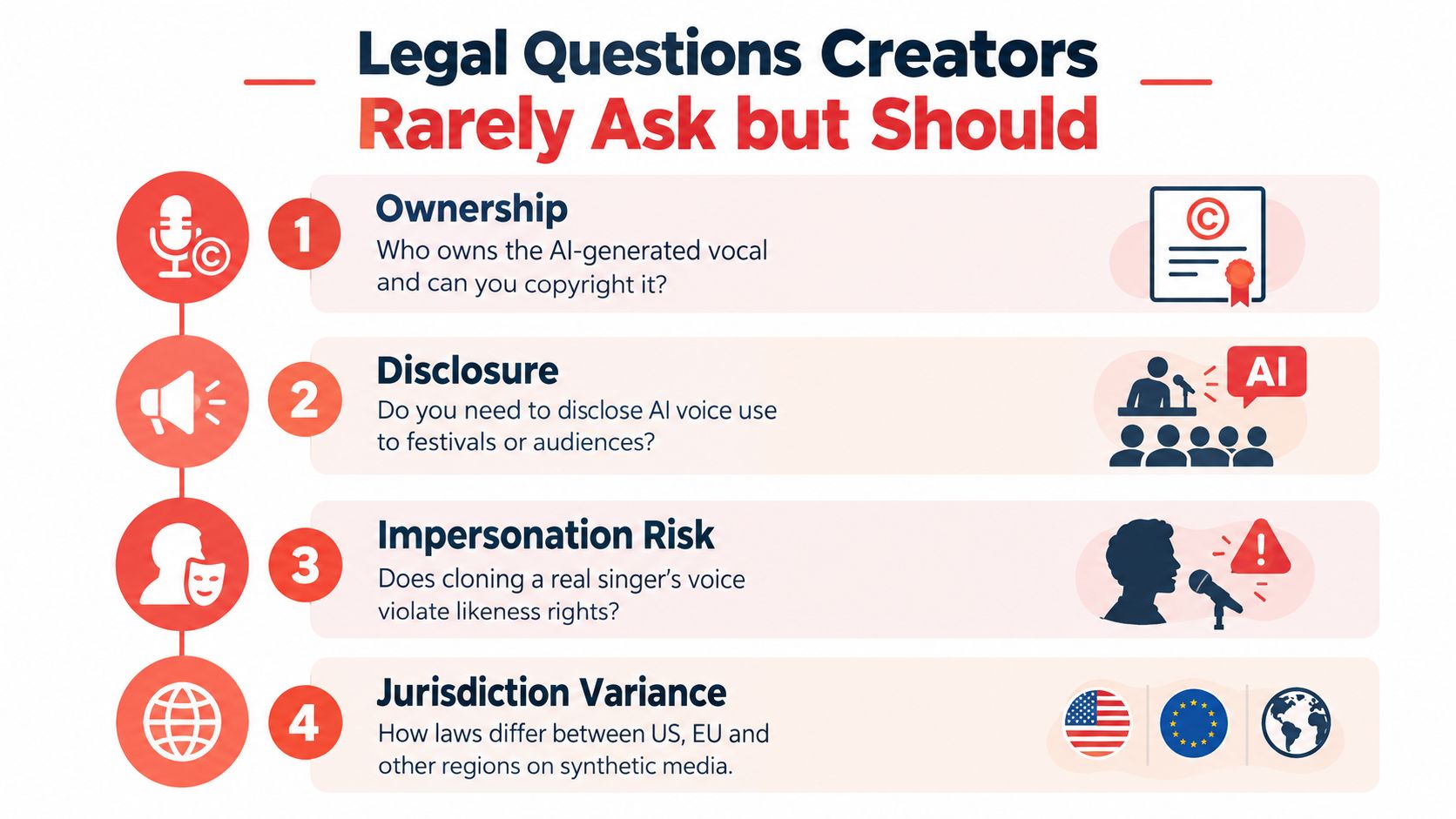
The first legal question is usually the wrong one. Creators ask whether they can use the tool, then skip the more important issue, what happens when the voice sounds like a real person, or when the delivery platform treats synthetic audio differently from a human performance. Those details matter more than the marketing page.
Ownership and disclosure are not the same question
If you generate a vocal with a licensed model, you need to know what the tool's terms grant you. If you clone a real singer, you also need to know whether the source voice was consented to, whether the output can be commercially released, and whether the likeness risks a publicity dispute. The answer changes based on the contract chain, not just the software interface.
That's why creators should check four layers before release. The generator's terms of service, the distribution platform's synthetic media policy, the festival's submission agreement, and any rights organization rules in the territory all matter. One approval doesn't guarantee the others.
Creator rule: if you can't explain where the voice rights came from, you probably can't defend the release if a dispute lands in your inbox.
What changes in practice across markets
By early 2025, the U.S. Copyright Office had stated that purely AI-generated outputs receive no copyright protection, which means authorship claims can get complicated quickly. In the EU, Article 50 of the AI Act is expected to require clear disclosure for synthetic audio when it could be mistaken for a real person, with the obligation taking full effect in August 2026. That means a short film, a trailer, and a social clip may each need different handling.
The primary challenge is not just legal ownership, it's audience trust and platform compliance. A festival screener, a streaming upload, and an Instagram teaser don't always follow the same labeling logic. If your film uses a recognizable voice shape, you also need to think about impersonation risk, because a sound-alike can raise publicity or unfair-competition concerns even when copyright isn't the main issue.
For a deeper look at who owns the output side of the equation, this guide is useful, who owns AI-generated film copyright questions every indie filmmaker should understand.
A Practical Checklist for Short Filmmakers
Once the legal boundaries are clear, behavior does most of the protecting. A short-film team can avoid a lot of trouble by treating the AI vocal like any other cast element, which means permissions, credits, and release notes need to be handled on purpose instead of after the festival screener is encoded.
The checklist to run before you export
- Get written consent early: If a living singer's likeness, voice, or recorded reference is used to seed a clone, keep a release in the project file. If a minor is involved, treat the clearance as a separate, more sensitive approval.
- Credit the synthetic element clearly: Put the AI vocal note in your title list, your press kit, and your submission paperwork. Don't bury it in a paragraph where programmers will miss it.
- Avoid public-figure mimicry: Don't build a voice print that closely tracks a named artist unless you have rights that clearly cover that use.
- Check metadata before delivery: Some tools embed labels or prompts in file metadata. Scrub anything that could leak a training prompt or create confusion during upload.
- Match the platform rules first: A YouTube upload, a festival screener, and a distributor file may each need different disclosure language.
The common failure point is reuse. A cloned voice that was cleared for one film can't automatically move into a sequel, a teaser, or a social cut without checking the permission again. That's where many first-time users get surprised, because the asset feels digital and reusable even when the rights are not.
Treat the last render like a delivery package, not a casual export. The person submitting the file in 2027 will have to answer whether the voice was disclosed, whether the source singer consented, and whether the output was labeled in a way the territory accepts. If those answers are clean, the tech stops being a liability and starts being a dependable part of the post workflow.
Where AI Singing Voices Are Headed Next
A 12-minute short delivered to festivals in 2027 may have a lead actor who recorded warm-up phrases for a hybrid score, a temp vocal that evolved into a final cue, and a disclosure package shaped to satisfy both platform labels and festival paperwork. The filmmaker won't be asking whether the technology exists. They'll be asking which vocal source is easiest to clear, how the mix translates in different deliverables, and which version of the file needs a synthetic audio label.
The near-term shift that matters most is real-time vocal rendering on set. That would let a director hear a playback performance while blocking a shot, which ties directly back to the production use case above. The second shift is multilingual lyric re-performance, which would help a short travel between territories without rebuilding the entire musical scene. The third is licensing clearinghouses, where consent, royalty splits, and reuse permissions are bundled into a more legible workflow.
Those changes won't remove the craft problems. They'll make them easier to manage. The question will still be whether the voice matches the scene, whether the viewer trusts it, and whether the rights are clean enough to survive distribution.
Pick one scene in an existing project this month and prototype the AI singing workflow on it. Use it as a temp vocal, test it against your edit, and write down where it helps and where it breaks. Then bring that result into your next planning meeting with Indie Shorts Mag as part of your broader short-film prep, because the fastest way to understand the tool is to put it inside a real scene.
No comments yet.
Got Something to add to this article?
Your email address will not be published. Required fields are marked *